

You open Claude for one quick task and hit the wall: usage limit reached, come back later.
The reflex is to price the next tier. Before you do, look at how your chats run. The meter counts far more than your words, and much of what it counts is a setting or a habit you control.
My own content system runs on Claude Code. For the posts dated Oct 19 to Nov 1, it logged 772 separate Claude Code sessions. Three of the habits below are written into its rules: a fresh session for every job, fresh checkers for every draft, and a model picked per seat.
By the end of this issue you will know what your limit counts. You will also have six habits that stretch it, two paste-ready prompts and a five-minute setup to run today.
The six, one line each:
One seat, one job. Conversation length is on the meter.
Send the whole brief up front. The brief arrives complete, so the answer can too.
Repair the brief and resend. A missed answer points at a gap in your prompt.
Size the settings to the task. Tools, connectors, extended thinking and effort each cost.
Park your reference files once. Cached Project content counts less when reused.
Read your two clocks first. Start heavy builds on a fresh session.
New here? Welcome. Someone sent you this? Thank them, then subscribe so the next one lands in your inbox.
Where this comes from
Ruben Hassid published “Limits.“ on Oct 7, 2026: 22 rules for getting more out of a Claude plan. It drew 435 reactions against his usual 364, so the wall is a problem readers feel.
His list is wide. This issue goes deep on six: why each works, how to tell when you need it, the prompt to paste, and what it looks like inside a system that runs all day. Habits 1, 2, 4, 5 and 6 trace to Anthropic’s own Help Center. Habit 3’s edit-and-resend move comes from Ruben’s article, and I credit it there. Where his list and Anthropic’s pages differ, I go with Anthropic and say so.
What your limit counts
Anthropic’s usage limit best practices page (checked Oct 31, 2026) lists what moves the meter:
how long your messages are and how big your attachments are
how long the current conversation has run
tools like Research and web search
the model you pick and the effort level you set
artifacts, and multi-step work like running code, creating files or browsing
Three more facts from the usage and length limits page (checked Oct 31, 2026) change how you plan a day.
One pool for every surface. Usage on claude.ai, Claude Code and Claude Desktop counts toward the same limit. An afternoon of coding spends the same budget as your morning writing.
Two clocks. A session starts with your first message, and in Anthropic’s words “your limit resets in full five hours later.” A weekly limit sits on top, and it resets at a fixed time assigned to your account.
Long chats get summarized, and that costs. With code execution on, Claude summarizes earlier messages when a chat nears its context limit, so the chat can keep going. Anthropic says longer conversations that trigger this consume more of your usage.
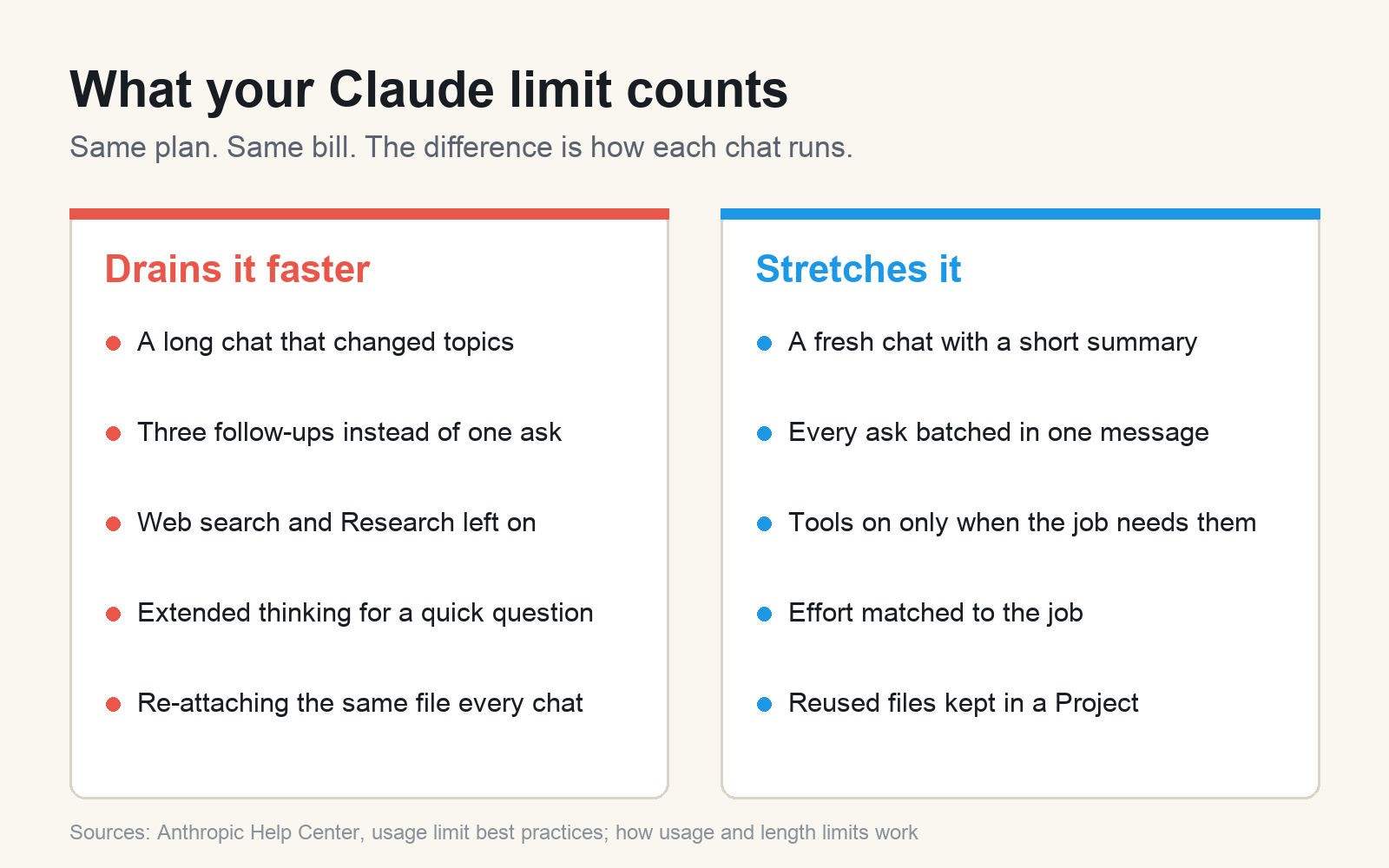
Left: what drains the pool. Right: the swap for each.
The six habits
1. One seat, one job
Conversation length is one of the things your limit counts.
A chat that started as “plan my week” and is now on its fourth unrelated task carries all of that history forward. Anthropic’s usage and length limits page suggests starting a new conversation when a long one nears your limit.
Before you leave the old chat, paste this:
Write a handoff note for a fresh chat, four labeled lines. JOB: the one task the next chat does. READ: the files or text it needs. LOCKED: choices already made, so it doesn’t reopen them. DONE WHEN: how we’ll know the work is finished.
Paste the note into the new chat. My writer seats work the same way: each starts with a list of files to read whole and a checklist it must pass.
How to tell it’s time: the topic has changed twice, or you scroll up to find what you decided.
How my system runs it: every step of a post runs as its own fresh Claude Code session. One seat, one job, one new session. The runner never continues an earlier seat’s chat. For the posts dated Oct 19 to Nov 1, that came to 772 fresh sessions across 14 post folders. The busiest seat, the route agent, ran 420 times. Each run started clean.
The handoff note is plain text, so it works the same way in ChatGPT or Gemini.
2. Send the whole brief up front
Group related questions into a single message.
That is close to Anthropic’s own advice: plan the conversation, batch similar requests, and review your message before you send it “to reduce the need for follow-up messages.”
“Can you also…”, “one more thing” and “make it shorter” are three extra rounds where one would do. Each round makes the chat longer, and length is on the meter.
Read the brief below. If a detail is missing, stop and list what you need. Once I answer, do all three: [task 1], [task 2], [task 3].
Worked example. Three messages: “Write a LinkedIn post about our launch.” Then “Shorter.” Then “Add a line on pricing.” One message: “Write a LinkedIn post about our launch, under 150 words, with one line on pricing. If a detail is missing, list it first.”
Why the questions come first: a missed brief costs you a full answer plus a correction. A short list of questions costs one short reply. That step is my addition; Anthropic’s page doesn’t include it.
3. Repair the brief and resend
When an answer misses, fix the prompt, not the answer.
Replying “no, I meant…” adds your correction and a second full answer to the thread. Instead, edit the message you sent, add what was missing, and resend it. Ruben’s article describes what happens next: “If you edit your prompt, the chat restarts from this point.”
Worked example. You asked for a subject line and got something stiff. Skip the “more casual” reply. Edit the prompt to read: “Write three casual subject lines for this email, under 40 characters each.”
How my system runs it: a draft is never fixed by arguing with the writer in a long thread. Separate checker seats (facts, voice, skim, value) each read the draft in a fresh context. The writer then gets one edit order and makes those changes.
The habit underneath: each time you catch yourself typing a correction, ask what the first prompt was missing. Put it in the first prompt next time.
4. Size the settings to the task
Tools, connectors, extended thinking and effort all draw on the meter.
Anthropic’s usage and length limits page says: “Tools and connectors are token-intensive,” and “Higher effort uses more tokens.” It also suggests turning extended thinking off when you don’t need it.
Claude’s own menu says it too. Open the model menu in the chat box and look at the effort list: Low, Medium (marked Recommended), High, Extra and Max. Max carries a warning label: “5× or more usage.”
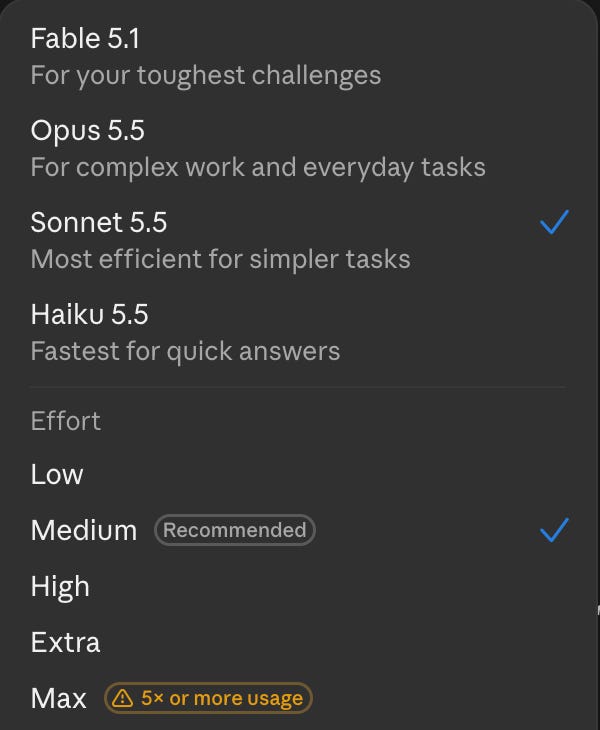
The effort setting lives one click from where you type. Max is flagged in the app itself.
So set each chat to the job:
Quick rewrite or answer: Leave on: Medium effort or lower. Switch off: search, Research, extended thinking.
A question about this week’s news: Leave on: web search. Switch off: Research, connectors you aren’t using.
A hard plan or analysis: Leave on: extended thinking, higher effort. Switch off: connectors you won’t touch.
The model is on the meter too, and the same menu describes each one. Sonnet 5.5 reads “Most efficient for simpler tasks.” Haiku 5.5 reads “Fastest for quick answers.”
How my system runs it: each seat has its own model, set in the system’s contract. The plan judge runs on Sonnet. The writer and the main judges run on Opus. The bigger model goes where the writing and the hardest judging happen.
5. Park your reference files once
Project content is cached and counts less when reused.
Those are close to Anthropic’s words: content in projects “counts less against your limits when reused.” Attach the same style guide to chat after chat, and it misses that cached rate.
Park it in a Project and leave it there. Then work in batches, because Anthropic also says “Caches expire after a period of inactivity.” Come back after a long break, and the cache may have expired.
What belongs in a Project: anything you attach more than twice a week. A voice guide, an offer one-pager, a client brief, a product list with prices. One-off files stay out.
In Gemini: Gems take files too. Google’s Gems help page (checked Oct 31, 2026) says you can add files “to give your Gem more context.” Load the reference once, then start new chats from the Gem. The caching detail above is Anthropic’s; Google’s page makes no usage claim.
6. Read your two clocks first
Settings > Usage shows your session and weekly bars.
Anthropic’s page says paid plans see progress bars there for the five-hour session and the weekly limit. Here is mine, taken Oct 31. It is from my plan, which the page labels Ultra. Your bars will read differently on Pro or Max, so compare against your own page, and leave my percentages out of it.
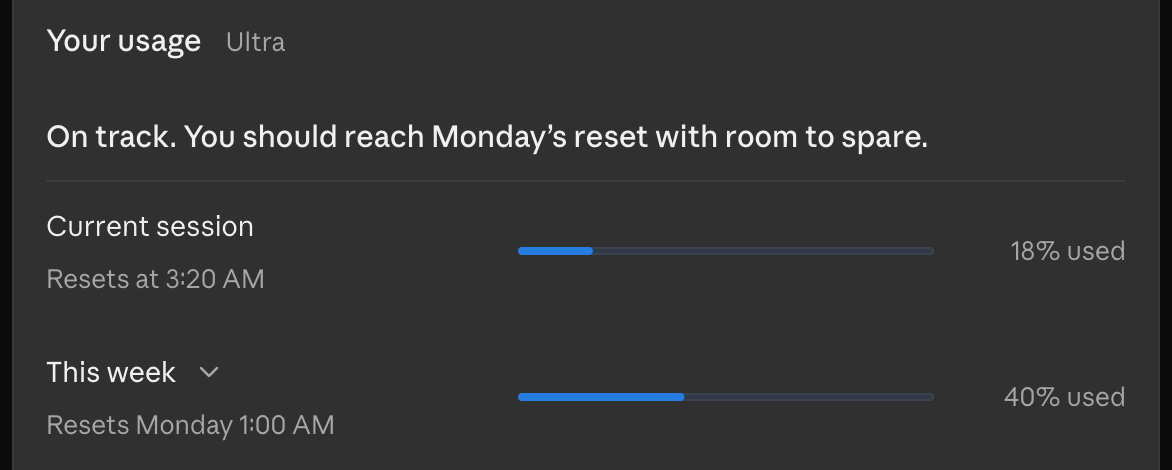
Two bars, two reset times, and a plain-English read on the week.
Two reads matter before heavy work:
Session bar high? Do the light work now. The session clock starts with your first message, so start the big build when a fresh session opens.
Weekly bar high? Decide whether to spend heavy work now or hold it for after the reset.
One more thing the page settles. My weekly reset shows Monday 1:00 AM. Ruben’s article reports his on Sunday evening. Anthropic says the weekly reset is a fixed time assigned to your account, so read yours off your own Settings > Usage page.
Where this falls short
These habits stretch the plan you have. They won’t turn a light plan into a heavy one.
If you code every day or live in Research, you may still need more room. Anthropic’s Max plan page (checked Oct 31, 2026) lists Max at $100 a month, with “five times the Pro plan’s usage every five hours and every week.” Paid plans can also turn on usage credits. When you hit a limit, work continues on credits instead of stopping.
I also left out several of Ruben’s rules: the ones that rest on one model’s cost against another, or on his own read of reset times. I could not check those on Anthropic’s pages.
And the numbers here are the ones I measured: sessions and seats. I didn’t measure tokens or dollars for this issue, so you won’t see any.
Do this today (5 minutes)
Read your two clocks. Open Settings > Usage. Note your session bar, weekly bar and both reset times.
One seat, one job. Take your longest open chat. Run the four-line handoff note and start fresh.
Park your reference files. Move the one file you attach most into a Project.
Size the settings. Disconnect any connector you haven’t used this week.
Size the settings, again. On your next quick question, turn off search and extended thinking, and set effort to Medium or lower.
Send the whole brief. Next time you’d send three follow-ups, send one message with the missing-detail line.
Where I stand
The system receipts and the usage page above come from my own logs and my own account, and when something falls short, the limitations section says so. Nobody pays me to say any of it.
Leverage over hustle. This week: start one fresh chat where you’d have kept going.
Eric
If this issue placed you, send it to one operator a rung below you. You will be the reason they climb.
PS: 3 ways I can help you:
Free Resources: swipe files, templates and AI prompts.
Online Courses: step-by-step frameworks to build and scale.
Book a 1:1 Strategy Call: 30 minutes, your next 3 moves.